
Support
REGISTRATION INSTRUCTIONS FOR THE HRDA'S HERMES PLATFORM
To officially submit your application to the HRDA's HERMES platform, please proceed with the following actions in the following order:
- Employer registration as a Natural Person
- Registration of a contact person (of the company) as a Natural Person
- Company Registration as a Legal Entity
- Acquisition of Employer Role by the Legal Entity (the company)
- Registration of candidates for participation as Natural Persons
- Connecting candidates for participation with their employer, with an authorization code from the Legal Entity's (company's) account.
- Completion of an application to the Training Program by the Legal Entity of the Company.
The link to the HRDA 's HERMES digital portal is as follows: https://ermis.anad.org.cy/#/front
Creation of a Natural Person:
The employer, the contact person, the company's employees, and those who wish to participate in a training program with the possibility of a subsidy from the HRDA, need to create an account with ERMI as Natural Persons.
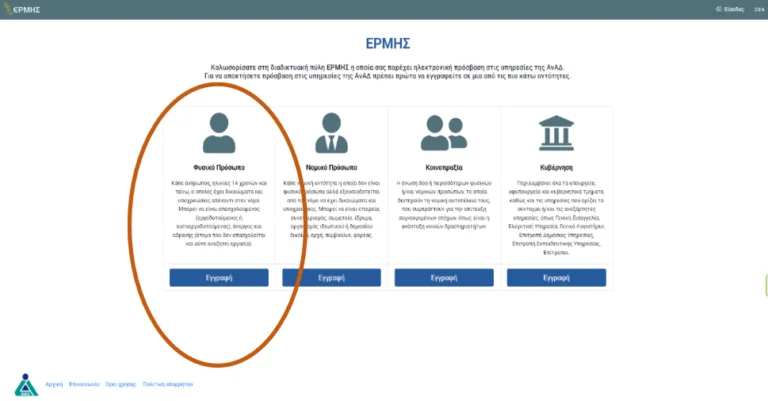
With the link to the HERMES system, we proceed to the registration of a Natural Person .
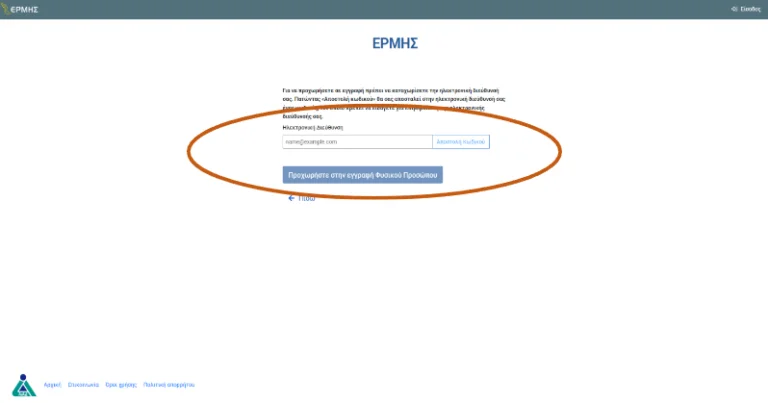
Then, after pasting the code that appears in the email, the application for creating a Natural Person opens.
To submit an application for an Individual, it is initially required to complete the fields with the individual's details and attach:
- Copy of ID card/passport on both sides.
Make sure the name matches what is written on the ID card/passport, as does the number.
Upon approval of the account, the HRDA Registration Number (number - used as a username ) and a password are sent to the email , which must be changed upon first login to the platform.

Creation of a Legal Entity (Company):
It is necessary, before creating a Legal Entity, to create a Natural Person account for the company's employer and/or the contact person in the same manner as mentioned above.
With the link: https://ermis.anad.org.cy/#/front you connect to the HERMIS platform
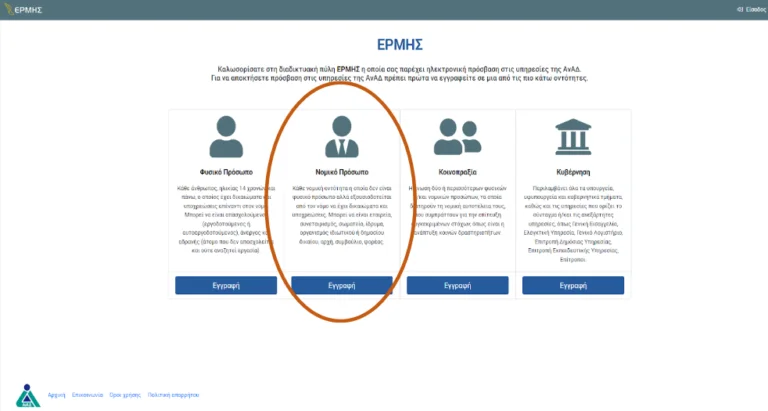
Then you select the Legal Entity registration , where you fill in the company details.
The following must be completed and attached to the Legal Entity application :
- The number of the Certificate of Registration in the Register of Companies , Registrar of Associations and Foundations, Registrar of Trade Unions, etc., as the case may be. If the registration number includes characters, please enter them. For Public Law Organizations, enter the number of their establishment legislation.
- Documentation of registration in the register of the respective competent authority or body or legislation (for public law organizations) – Certificate of Incorporation of the Company and if there is a certificate of change of name (in this case the name must be consistent with the certificate of change of name while the date must be consistent with the date indicated on the Certificate of Incorporation and NOT on the certificate of change of name.
- Company shareholder certificate or other relevant evidence, e.g. articles of association or document with the composition of the Board of Directors, in the cases of Foundations, Public Law Organizations, Parties, Unions and Associations.
With the approval of the Legal Entity (approval is received in the form of an email, to which two documents with the application details are attached) and then changing the access password to ERMI, you are ready for the next step.
You connect with the details in the Legal Entity account and on the home page, select the Profile, Roles, Details field in order to complete the Employer Role application.
In Profile, Role, Details 🡪 Available roles 🡪 Employer 🡪 Request to acquire a Role
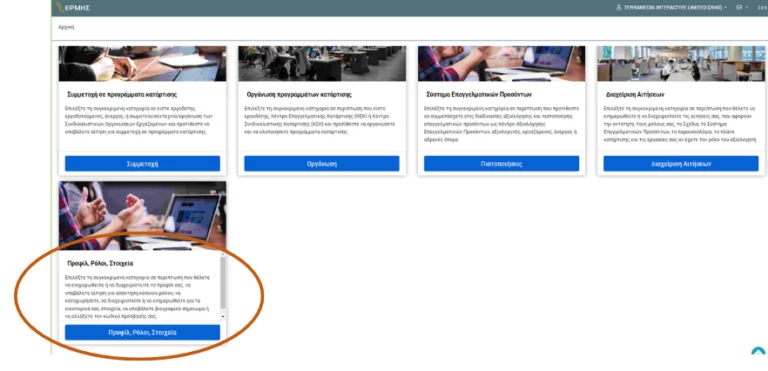
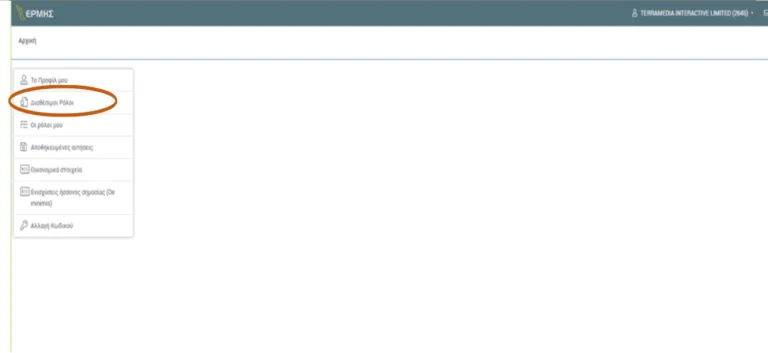
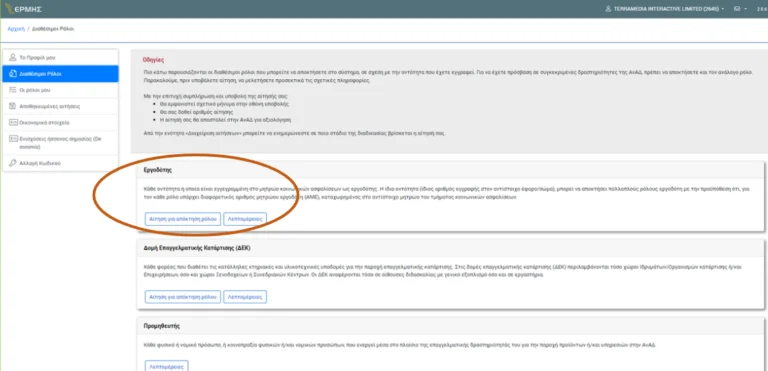
For the application to obtain an Employer Role, the following must be attached:
- The latest statement of earnings and social security contributions (The statement of earnings and social security contributions can be extracted from the "Contribution Payment System" of the Social Insurance Services (SISnet)
During the request, an Authorization Code will be requested from the employer and the contact person . The authorization codes can be obtained from the respective accounts of Natural Persons. If the employer is also a contact person, then the status is changed to Authorization Code from the same account .
Code from the company's Director/contact person/employer.
Depending on what is listed in HERMI, the person requests a code from: manager, contact person, employer (in this case we mean the Legal Entity of the company ), he must Login to HERMI 🡪select his NAME (top right) 🡪Create Authorization Code 🡪Property – accordingly 🡪copy the code and paste it where needed
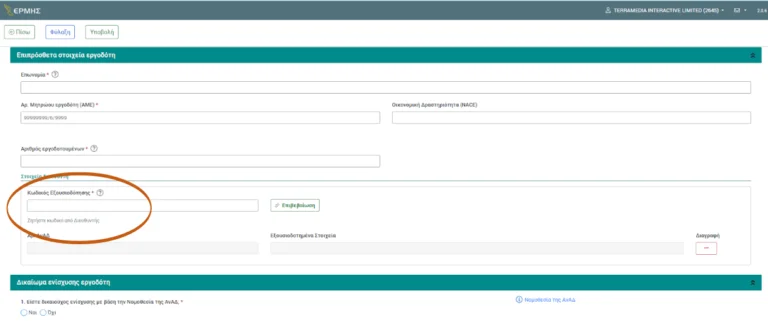
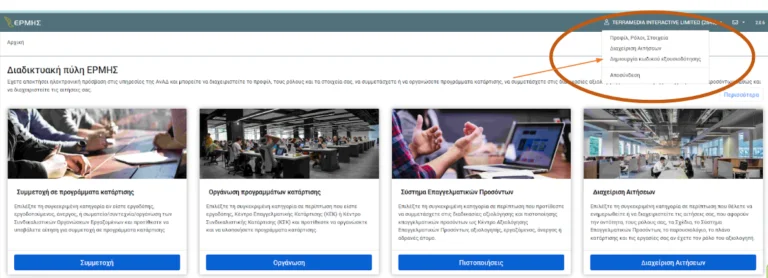
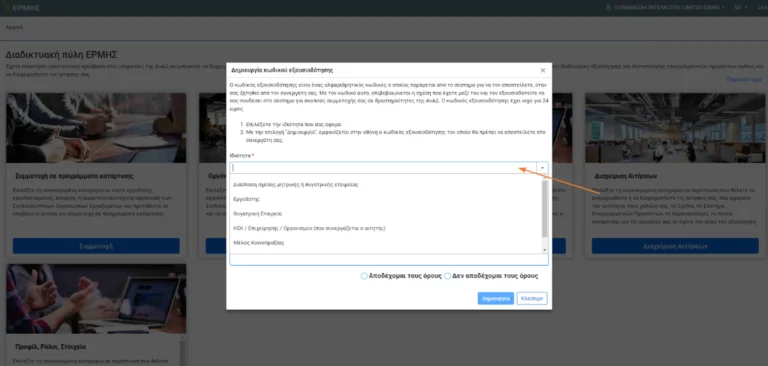
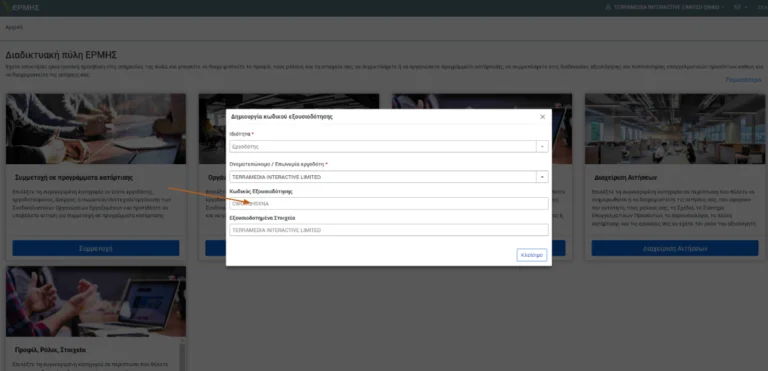
The approval process for an employer role request will take 1 – 2 days. You can find out if it has been approved in the Request Management, in the company-Legal Entity account.
Connection of employees (natural persons) with a company (legal entity) :
The employee must create a Personal Account.
In his application, after completing the information and attaching his identity card, he will request an authorization code from the company (Legal Entity) with the status of EMPLOYER (as mentioned above)
In case the Employee already has a Natural Person account:
He will enter his (Individual) profile and in the Profile and Roles field he will find his initial application, select modification without approval and then select YES to the question: ''will you participate in a training program?''
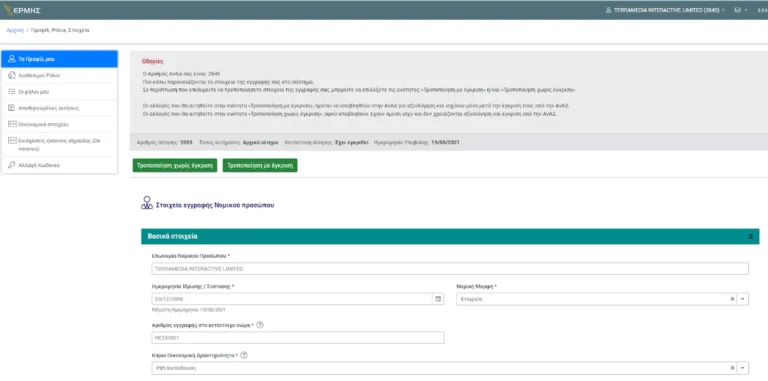
The two accounts will then be merged. The application for participation in the seminar can then be submitted by the Legal Entity.
Submit a training program application:
You must log in to your Legal Entity account at ERMI.
Select “Participation in Training Programs”, Participation. “Lifelong Learning”
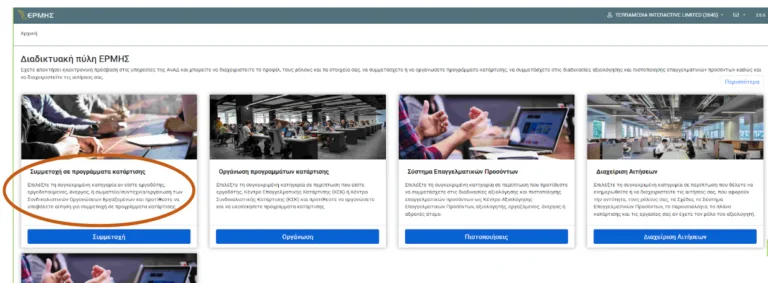
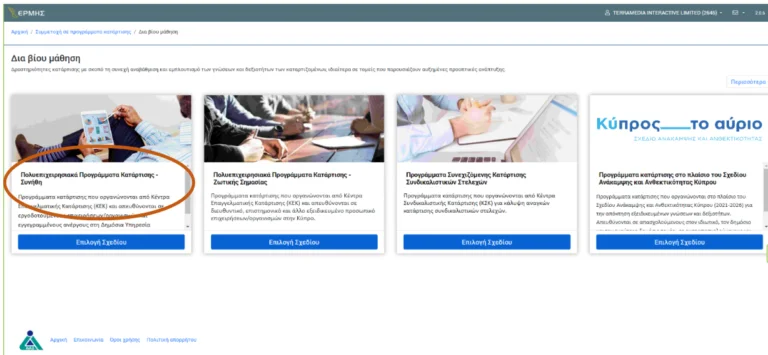
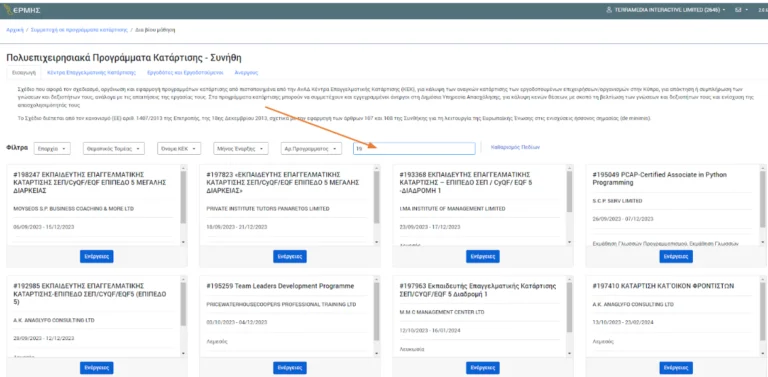
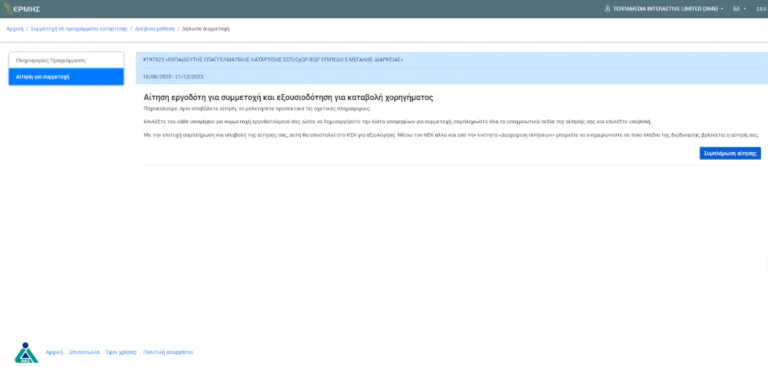
Complete the application and click Submit .
Your application appears in the KEK Legal Entity account , and you will be informed about the status of your application, its approval or rejection.
For further clarifications that you may need during your registration, you can contact us – 22322771 or for the “HERMES” Digital Portal, you can contact the HRDA Public Service Office at 22390300 ( option 2 ), or at the email address
HERMI INSTRUCTIONS FOR UNEMPLOYED, GRANT BENEFICIARY
To complete an application for the training program, it is required to attach the following forms, which are issued by the Public Employment Service (PES).
- Form R210 – Unemployment registration form at the labor department
- Form R237 – Referral for participation in two seminars per year
We are providing the email address where you will request the two forms (R210, R237) from the Employment Office, necessary for the application for participation in the program, through the HRDA platform, ERMI.
Nicosia
E-mail:
Limassol
Email:
Larnaca
Email:
Famagusta Free Zone (Paralimni)
Email:
Paphos
E-mail:
Specifically, in the message you will mention your name, telephone number and ID, requesting the unemployment registration form with renewal dates (R210) and the referral to the seminars for the current semester (R237).
Note : In order for your application to be approved in the HERMES system, on form R210, the start date of the seminar must be included in the dates of your unemployment renewal. This proves that you are unemployed at the start of the program.
To create an Individual account on the HERMES platform
Select the link: https://ermis.anad.org.cy/#/front
Select Individual registration
Complete the application, which requires the following to be attached:
- Copy of your ID card/passport.
Two attached documents will be sent to your email , the first one contains the Username (HRDA Registration Number ) and a password , which are used to LOGIN to HERMI , in order to change the password on the platform, for your convenience, log in and change the password.
Then, to submit the application through the HERMES platform:
After logging back into ERMI with the new password, select “ Participation in training programs ”, Participation , then “ Lifelong Learning ”, Select Category , and then “ Multi-Company Training Programs-Regular ” and Select.
Find the training program by its number (ask the KEK) and select Actions .
Then Application for participation 🡪 Application for unemployed, grant recipient 🡪 filling out an application .
Complete the application and select Submit .
When you click Submit , the application goes to us for approval.
For further clarifications that you may need during your registration, you can contact us – 22322771 or for the “HERMES” Digital Portal, you can contact the HRDA Public Service Office at 22390300 ( option 2 ), or at the email address
3. HERME INSTRUCTIONS FOR NON-BENEFICIARIES OF GRANTS
To create an Individual account on the HERMES platform, select the following link: https://ermis.anad.org.cy/#/front
Select Individual registration .
Complete the application, which requires the following to be attached:
- Copy of your ID card/passport.
Two attached documents will be sent to your email , the first one contains the Username (HRDA Registration Number ) and a password , which are used to LOGIN to HERMI , in order to change the password on the platform, for your convenience, log in and change the password.
After logging back into ERMI with the new password, select “ Participation in training programs ”, Participation , then “ Lifelong Learning ”, Select Category , and then “ Multi-Company Training Programs-Regular ” and Select.
Find the training program by its number (ask the KEK) and select Actions .
Then Application for participation 🡪 Application for participation of an employee, not a grant recipient , 🡪 completion of an application .
Complete the application and select Submit .
When you click Submit , the application goes to us for approval.
For further clarifications that you may need during your registration, you can contact us – 22322771 or for the “HERMES” Digital Portal, you can contact the HRDA Public Service Office at 22390300 ( option 2 ), or at the email address